This product was not featured by Product Hunt yet. It will not be visible on their landing page and won't be ranked (cannot win product of the day regardless of upvotes).
SecAIQ Watch for Mac
A local security monitor for the AI tools on your Mac
SecAIQ Watch shows which AI tools run on your Mac, what files and permissions they can reach, which MCP servers they use and where their traffic goes. Read-only, 100% local, no account. 14-day free trial, then $19.99/year.
Hi Product Hunt, I'm Safa, the maker of SecAIQ Watch. Some of you may know the free open-source edition I launched here last month. This is its native Mac sibling, built from your feedback.
AI coding agents, desktop assistants and MCP servers now run on our Macs with our own user rights. They read project files, run shell commands and talk to the network. I wanted plain answers to three questions and couldn't find one place that gave them:
What AI tools are running on my Mac?
What can they reach?
Where does their data go?
SecAIQ Watch is a native Mac app that answers them, on your machine:
Finds about 37 AI tool families (Claude Code and Desktop, Codex, Cursor, Windsurf, Copilot, Gemini CLI, Ollama, LM Studio, MCP servers, IDE extensions and more)
Permissions matrix: what each tool can access, what it actually did, and what changed since your first scan
Network activity per tool: destinations and data volumes, plus a session incident report you can export
Approvals view: spots risky start-up flags such as --dangerously-skip-permissions
Plain-language findings with evidence, and a posture grade from A to F
What it is not: monitoring is read-only. It never blocks, intercepts or changes anything on its own. There is no cloud analysis, no account for monitoring, and no prompts or file contents are collected. Everything stays on your Mac. The app only contacts secaiq.com to check your license and look for updates.
It has limits, and I say so in the app: file access is sampled, very short-lived processes can be missed, and a setting shows what a tool is configured to do, not proof of how it behaves. The screenshots here use the built-in demo data.
Pricing: 14-day free trial (no card, no account), then $19.99/year for one Mac. For Product Hunt: 50% off the first year for the first 50 buyers, applied automatically at checkout. A Windows version is in development. There is also a free open-source PHP edition on GitHub for macOS, Linux and Windows.
I'd love your feedback: which AI tools should I add next, and which risks should it flag first? I'll be here all day answering questions.
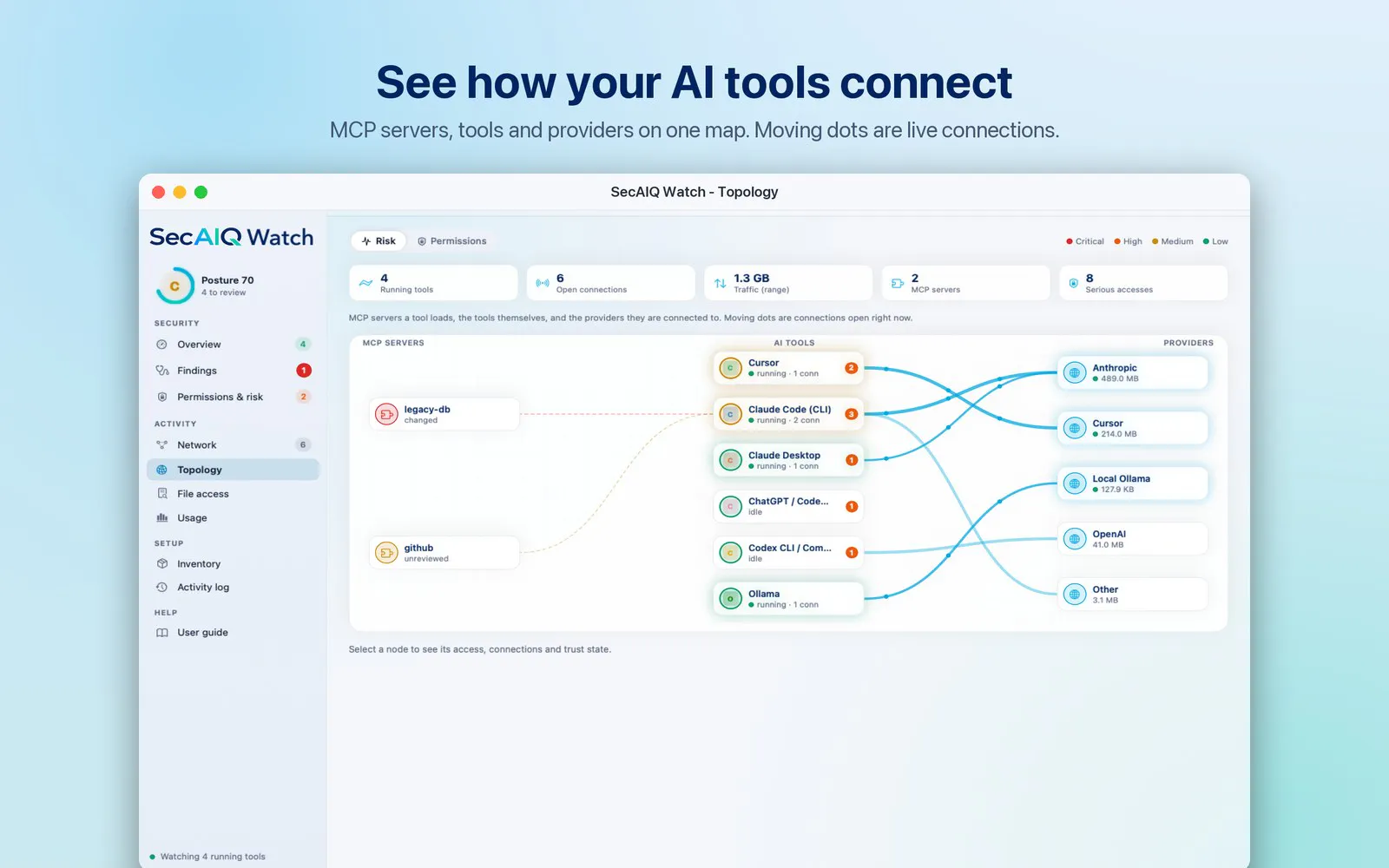
• Topology map: one picture of your AI tools, the MCP servers they load and the providers they connect to. Moving dots are connections open right now.
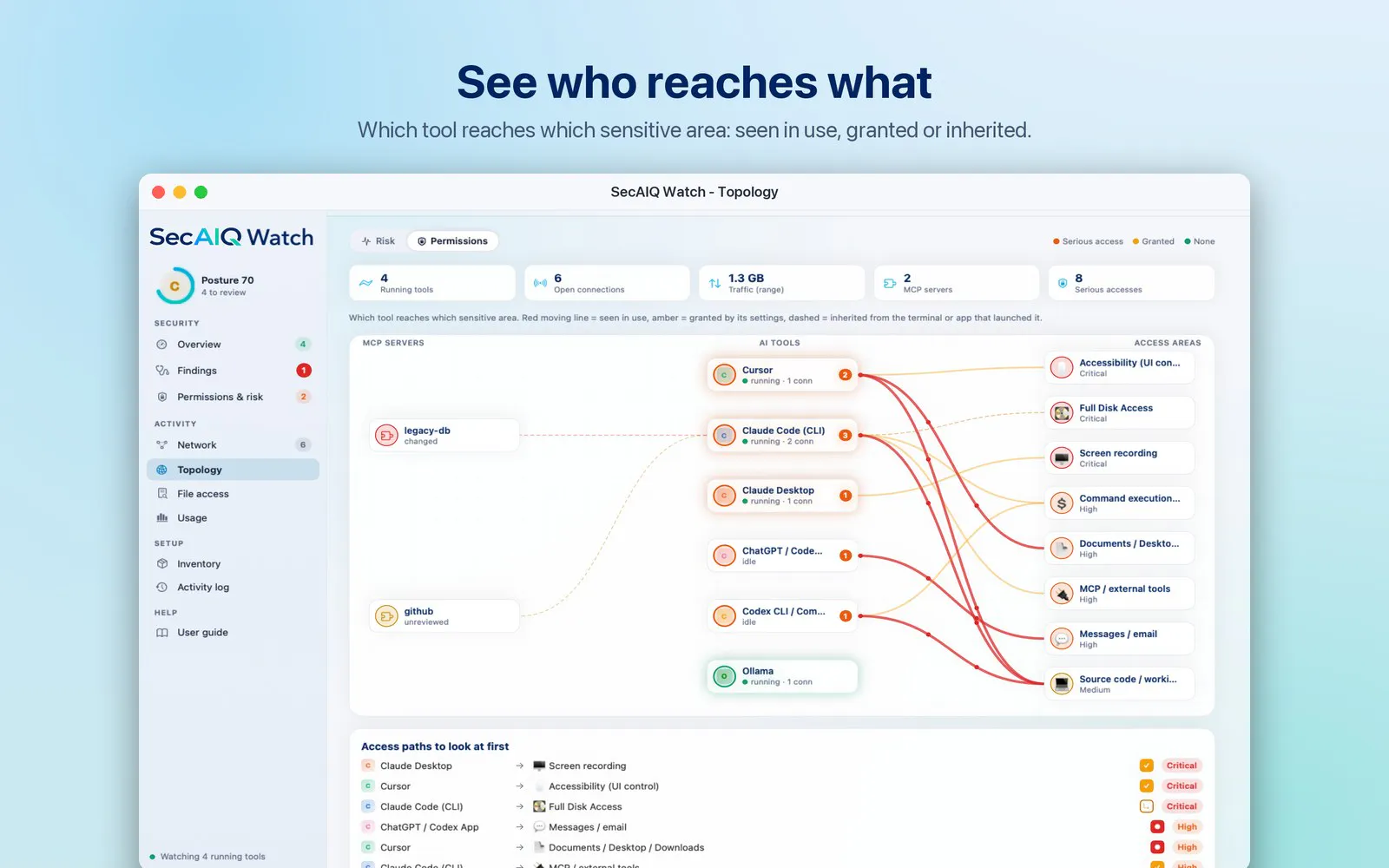
• Access view: which tool reaches which sensitive area (SSH keys, secrets, Full Disk Access, shell...), whether it was seen in use, granted by settings or inherited, plus the access paths to look at first.
• Developer security report (HTML export): what to fix first, what each AI tool can reach, MCP server trust and recent permission changes.
• Five more tools recognised: Trae, Void, Cherry Studio, Chatbox and Perplexity Comet.
Still read-only, 100% local, no account. Screens and details: secaiq.com/watch. Feedback is very welcome.
I’ll be honest, I’m feeling a little disappointed and confused by how quiet this launch has been.
I built SecAIQ Watch for Mac entirely on my own, investing considerable time and effort into creating a security tool for the growing AI coding ecosystem.
What makes this particularly confusing is that I've seen another open-source app in a similar space, with a more limited feature set, receive around 65 upvotes here on Product Hunt.
Meanwhile, SecAIQ Watch for Mac has received just 3.
I'm genuinely trying to understand why. Is it the way I presented the product? Did I launch at the wrong time? Am I simply not reaching the right audience?
I'm not expecting hundreds of upvotes, and I know nobody owes me their support. But as an independent developer, it's difficult not to question what went wrong when something you've worked so hard on barely gets noticed.
I'd genuinely appreciate some honest feedback from the community. What am I missing?
Even constructive criticism would mean more to me than silence.
Thanks to everyone who took the time to check out SecAIQ Watch. 💙
About SecAIQ Watch for Mac on Product Hunt
“A local security monitor for the AI tools on your Mac”
SecAIQ Watch for Mac was submitted on Product Hunt and earned 4 upvotes and 3 comments, placing #57 on the daily leaderboard. SecAIQ Watch shows which AI tools run on your Mac, what files and permissions they can reach, which MCP servers they use and where their traffic goes. Read-only, 100% local, no account. 14-day free trial, then $19.99/year.
SecAIQ Watch for Mac was featured in Mac (103.9k followers), Privacy (11.5k followers) and Artificial Intelligence (483k followers) on Product Hunt. Together, these topics include over 157.8k products, making this a competitive space to launch in.
Who hunted SecAIQ Watch for Mac?
SecAIQ Watch for Mac was hunted by Safa Paksu. A “hunter” on Product Hunt is the community member who submits a product to the platform — uploading the images, the link, and tagging the makers behind it. Hunters typically write the first comment explaining why a product is worth attention, and their followers are notified the moment they post. Around 79% of featured launches on Product Hunt are self-hunted by their makers, but a well-known hunter still acts as a signal of quality to the rest of the community. See the full all-time top hunters leaderboard to discover who is shaping the Product Hunt ecosystem.
Want to see how SecAIQ Watch for Mac stacked up against nearby launches in real time? Check out the live launch dashboard for upvote speed charts, proximity comparisons, and more analytics.

 Safa Paksu
Hi Product Hunt, I'm Safa, the maker of SecAIQ Watch. Some of you may know the free open-source edition I launched here last month. This is its native Mac sibling, built from your feedback.
AI coding agents, desktop assistants and MCP servers now run on our Macs with our own user rights. They read project files, run shell commands and talk to the network. I wanted plain answers to three questions and couldn't find one place that gave them:
What AI tools are running on my Mac?
What can they reach?
Where does their data go?
SecAIQ Watch is a native Mac app that answers them, on your machine:
Finds about 37 AI tool families (Claude Code and Desktop, Codex, Cursor, Windsurf, Copilot, Gemini CLI, Ollama, LM Studio, MCP servers, IDE extensions and more)
Permissions matrix: what each tool can access, what it actually did, and what changed since your first scan
Network activity per tool: destinations and data volumes, plus a session incident report you can export
Approvals view: spots risky start-up flags such as --dangerously-skip-permissions
Plain-language findings with evidence, and a posture grade from A to F
What it is not: monitoring is read-only. It never blocks, intercepts or changes anything on its own. There is no cloud analysis, no account for monitoring, and no prompts or file contents are collected. Everything stays on your Mac. The app only contacts secaiq.com to check your license and look for updates.
It has limits, and I say so in the app: file access is sampled, very short-lived processes can be missed, and a setting shows what a tool is configured to do, not proof of how it behaves. The screenshots here use the built-in demo data.
Pricing: 14-day free trial (no card, no account), then $19.99/year for one Mac. For Product Hunt: 50% off the first year for the first 50 buyers, applied automatically at checkout. A Windows version is in development. There is also a free open-source PHP edition on GitHub for macOS, Linux and Windows.
I'd love your feedback: which AI tools should I add next, and which risks should it flag first? I'll be here all day answering questions.