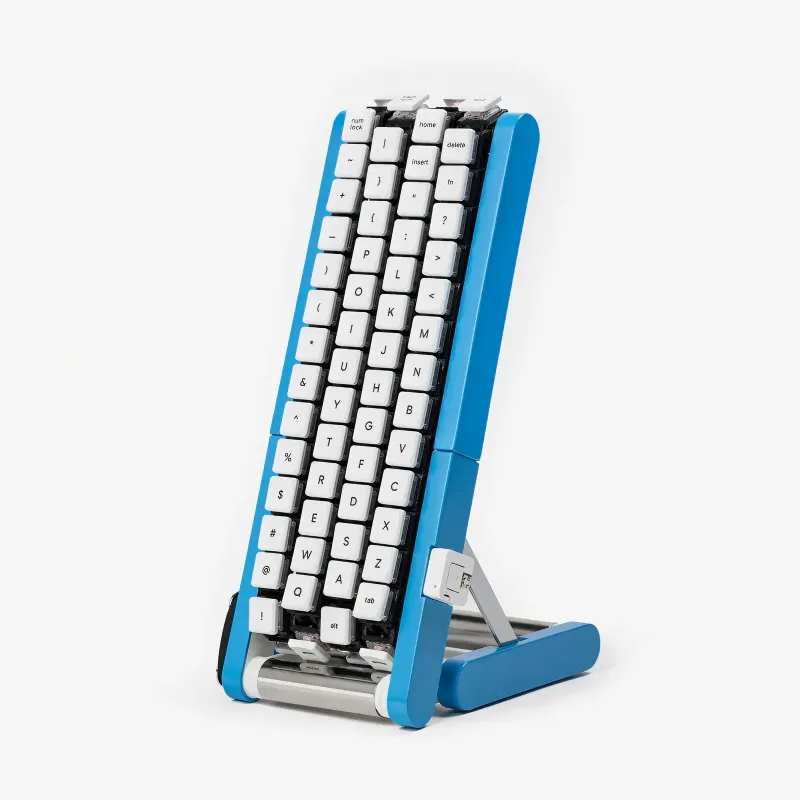
Gboard Kurukuru Version is a conveyor belt keyboard from Google Japan's Gboard team, its 15th. Four belts carry 29 keys each past your fingers, so one hand can reach every character. It isn't for sale, but STL files, firmware and a build guide are on GitHub.
Google Japan's Gboard team keeps coming up with wonderfully odd keyboard ideas, and it has become a yearly tradition. This is the 15th, after a one-key Morse keyboard, a teacup, a rotary phone and a hat.
This year's is the Gboard Conveyor Belt Version in the repo, and くるくる in Japanese. Kurukuru is the sound of something going round and round, which is what the keys do. Four belts carry 29 keys each, 116 in total, and the letter you want comes around to your fingers. Upper and lower case are both on the belts, and one hand is enough for everything.
You can also build it. The build guide covers the 3D-printed frame, an N20 motor and Choc low-profile switches, with KiCad board files and firmware in the same repo. The keycaps in the parts list are blank, so what goes on them is up to you!
I love that Google still spends time building things like this haha. Is it practical? Probably not. Would I love to try it? Absolutely. Curious how long it would actually take to type a full sentence compared to a regular keyboard.
What a delightfully clever twist bringing the keys to your fingers instead of moving your fingers to the keys, and open-sourcing the whole build makes it even better.
the conveyor belt idea is smart and makes typing in diffrent languages much easier
About Gboard Kurukuru Version on Product Hunt
“Your fingers stay put. The keys come around”
Gboard Kurukuru Version launched on Product Hunt on October 11th, 2026 and earned 92 upvotes and 5 comments, placing #10 on the daily leaderboard. Gboard Kurukuru Version is a conveyor belt keyboard from Google Japan's Gboard team, its 15th. Four belts carry 29 keys each past your fingers, so one hand can reach every character. It isn't for sale, but STL files, firmware and a build guide are on GitHub.
Gboard Kurukuru Version was featured in Custom Keyboards (2.3k followers), Hardware (11.5k followers) and DIY (1.1k followers) on Product Hunt. Together, these topics include over 4.4k products, making this a competitive space to launch in.
Who hunted Gboard Kurukuru Version?
Gboard Kurukuru Version was hunted by Zac Zuo. A “hunter” on Product Hunt is the community member who submits a product to the platform — uploading the images, the link, and tagging the makers behind it. Hunters typically write the first comment explaining why a product is worth attention, and their followers are notified the moment they post. Around 79% of featured launches on Product Hunt are self-hunted by their makers, but a well-known hunter still acts as a signal of quality to the rest of the community. See the full all-time top hunters leaderboard to discover who is shaping the Product Hunt ecosystem.
Reviews
Gboard Kurukuru Version has received 72 reviews on Product Hunt with an average rating of 4.86/5. Read all reviews on Product Hunt.
Want to see how Gboard Kurukuru Version stacked up against nearby launches in real time? Check out the live launch dashboard for upvote speed charts, proximity comparisons, and more analytics.

 Zac Zuo
Hi everyone!
Google Japan's Gboard team keeps coming up with wonderfully odd keyboard ideas, and it has become a yearly tradition. This is the 15th, after a one-key Morse keyboard, a teacup, a rotary phone and a hat.
This year's is the Gboard Conveyor Belt Version in the repo, and くるくる in Japanese. Kurukuru is the sound of something going round and round, which is what the keys do. Four belts carry 29 keys each, 116 in total, and the letter you want comes around to your fingers. Upper and lower case are both on the belts, and one hand is enough for everything.
You can also build it. The build guide covers the 3D-printed frame, an N20 motor and Choc low-profile switches, with KiCad board files and firmware in the same repo. The keycaps in the parts list are blank, so what goes on them is up to you!