This product was not featured by Product Hunt yet. It will not be visible on their landing page and won't be ranked (cannot win product of the day regardless of upvotes).
Product upvotes vs the next 3
Waiting for data. Loading
Product comments vs the next 3
Waiting for data. Loading
Product upvote speed vs the next 3
Waiting for data. Loading
Product upvotes and comments
Waiting for data. Loading
Product vs the next 3
Loading
GhostCode
Open-source starter template for a terminal coding harness
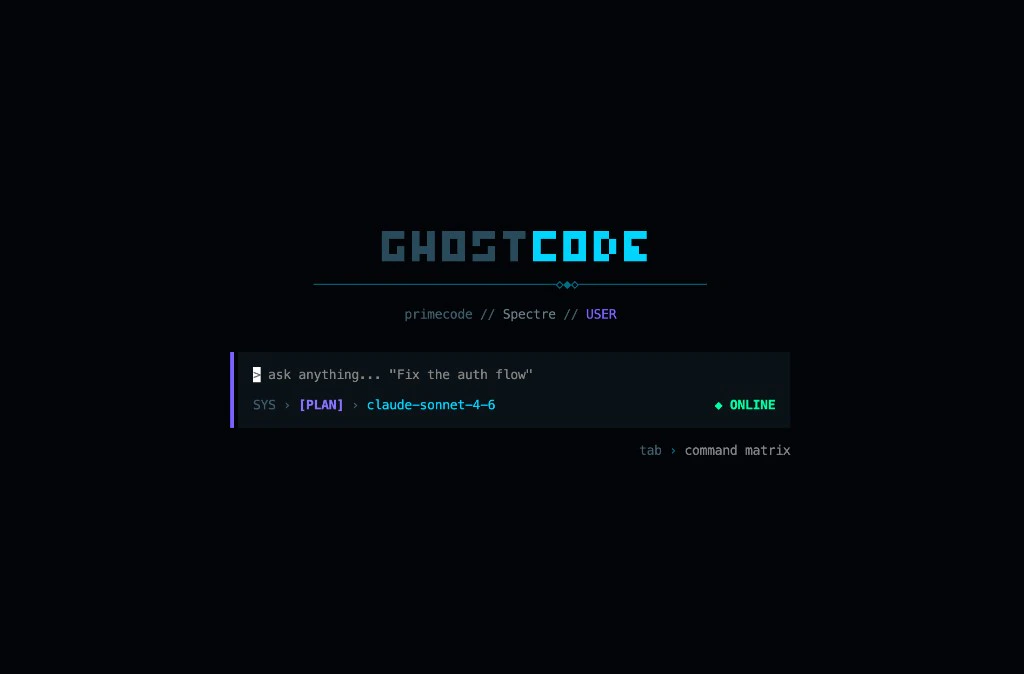
I built GhostCode because coding harnesses got smarter and I understood them less. Small open-source terminal harness you can read and fork — not a Claude Code clone. Local-first, your API keys. Bun + AI SDK. PLAN + BUILD modes, custom TUI, prompts, tools, Ghost.md memory, JSONL sessions. Good for developers who want to own their harness, not rent one.
GhostCode is an open-source starter template for a terminal coding harness — not a Claude Code or OpenCode replacement.
I built it because I wanted to understand how coding agent harnesses actually work: streaming, tool calls, local execution, session persistence. The big tools got smarter; I understood them less. So I made something small enough to read in an afternoon and fork without drowning in code.
What you get: • Local-first — your API keys, your machine, no hosted account stack • PLAN mode (read-only) + BUILD mode (edit files + shell) • Bun + AI SDK — swap Anthropic and OpenAI at runtime • Customizable TUI, prompts, tools, and Ghost.md project memory • Session persistence as JSONL under ~/.ghostcode/projects/ • MIT license — fork it, rename it, ship your version
What's missing (on purpose): no MCP, no sub-agents yet. This is a learning template, not a feature parity play.
Good for developers who want to own their harness, not rent one.
“Open-source starter template for a terminal coding harness”
GhostCode was submitted on Product Hunt and earned 4 upvotes and 1 comments, placing #143 on the daily leaderboard. I built GhostCode because coding harnesses got smarter and I understood them less. Small open-source terminal harness you can read and fork — not a Claude Code clone. Local-first, your API keys. Bun + AI SDK. PLAN + BUILD modes, custom TUI, prompts, tools, Ghost.md memory, JSONL sessions. Good for developers who want to own their harness, not rent one.
On the analytics side, GhostCode competes within Open Source, Developer Tools, Artificial Intelligence and GitHub — topics that collectively have 1.1M followers on Product Hunt. The dashboard above tracks how GhostCode performed against the three products that launched closest to it on the same day.
Who hunted GhostCode?
GhostCode was hunted by Amit Mishra. A “hunter” on Product Hunt is the community member who submits a product to the platform — uploading the images, the link, and tagging the makers behind it. Hunters typically write the first comment explaining why a product is worth attention, and their followers are notified the moment they post. Around 79% of featured launches on Product Hunt are self-hunted by their makers, but a well-known hunter still acts as a signal of quality to the rest of the community. See the full all-time top hunters leaderboard to discover who is shaping the Product Hunt ecosystem.
For a complete overview of GhostCode including community comment highlights and product details, visit the product overview.

 Amit Mishra
GhostCode is an open-source starter template for a terminal coding harness — not a Claude Code or OpenCode replacement.
I built it because I wanted to understand how coding agent harnesses actually work: streaming, tool calls, local execution, session persistence. The big tools got smarter; I understood them less. So I made something small enough to read in an afternoon and fork without drowning in code.
What you get:
• Local-first — your API keys, your machine, no hosted account stack
• PLAN mode (read-only) + BUILD mode (edit files + shell)
• Bun + AI SDK — swap Anthropic and OpenAI at runtime
• Customizable TUI, prompts, tools, and Ghost.md project memory
• Session persistence as JSONL under ~/.ghostcode/projects/
• MIT license — fork it, rename it, ship your version
What's missing (on purpose): no MCP, no sub-agents yet. This is a learning template, not a feature parity play.
Good for developers who want to own their harness, not rent one.
Try it: npm install -g ghostcode-cli (needs Bun)
Quick start:
npm install -g ghostcode-cli
export ANTHROPIC_API_KEY=...
ghostcode
Build-your-own walkthrough